
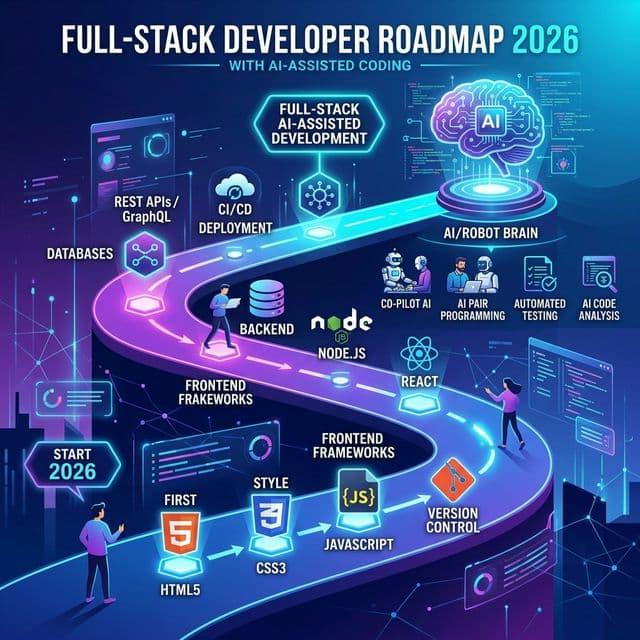
If you're learning full-stack development in 2026 the same way people did in 2022, you're already behind.
The developer landscape has fundamentally shifted. AI-assisted coding tools like GitHub Copilot, Cursor, Claude Code, and Amazon CodeWhisperer aren't just nice-to-have anymore — they're becoming as essential as knowing Git. Companies are now listing "experience with AI coding tools" in their job descriptions. Developers who embrace AI are shipping 2–3x faster. Those who don't are being left behind.
This guide gives you the complete 2026 Full-Stack Developer Roadmap — updated with AI-first practices at every stage. Whether you're a beginner starting from scratch or an experienced developer looking to modernize your workflow, this roadmap will show you exactly what to learn and in what order.
What Changed in 2026? The AI Revolution in Coding
Before we dive into the roadmap, let's understand why the traditional learning path needs an update:
❌ The Old Way (2020–2023)
- Memorize syntax for HTML, CSS, JS
- Manually write every line of boilerplate
- Google + Stack Overflow for every error
- Spend hours on CSS layouts
- Learn one framework deeply, ignore others
- No AI tools in the workflow
✅ The New Way (2026+)
- Understand concepts; let AI handle syntax
- AI generates boilerplate; you architect
- AI debugger explains errors in context
- AI generates responsive layouts from prompts
- Understand multiple stacks; specialize with AI
- AI pair-programming is a core skill
💡 Key Insight
AI doesn't replace developers — it replaces slow developers. The engineers who learn to leverage AI tools effectively can do the work of 2–3 developers. That's why companies are hiring for this skill specifically.
The Complete 2026 Full-Stack Roadmap
Here's the step-by-step path, organized into 6 phases. Each phase builds on the previous one. AI integration points are marked at every stage.
Phase 1: Foundation (Weeks 1–4)
🌐 HTML, CSS & JavaScript Fundamentals
You still need to understand the basics. But in 2026, the way you learn them is different:
- HTML5: Semantic elements, forms, accessibility (ARIA), SEO-friendly structure
- CSS3: Flexbox, Grid, responsive design, CSS variables, animations
- JavaScript (ES6+): Arrow functions, destructuring, promises, async/await, modules, DOM manipulation
🤖 AI Integration: Use GitHub Copilot or Cursor to generate HTML structure from descriptions. Practice by describing a layout in English, then reviewing what AI generates. This teaches you to read and evaluate code — the most important skill.
Phase 2: Frontend Framework (Weeks 5–10)
⚛️ React.js (or Next.js)
React remains the dominant frontend framework in 2026. Here's what to learn:
- Core: Components, JSX, Props, State, Hooks (useState, useEffect, useRef)
- Advanced: Context API, custom hooks, React Router, error boundaries
- Next.js 15+: Server Components, App Router, SSR/SSG, API routes, middleware
- State Management: Zustand (lightweight) or Redux Toolkit (enterprise)
- Styling: Tailwind CSS v4 or CSS Modules
🤖 AI Integration: Use AI to scaffold components, generate TypeScript types, write unit tests, and convert designs to code. The key skill to develop is prompting — describing exactly what you need in clear, specific language.
Phase 3: Backend Development (Weeks 11–16)
🔧 Node.js + Express/Fastify (or Python + FastAPI)
Choose your backend stack. Both are equally valid in 2026:
JavaScript Stack
- Node.js + Express/Fastify
- REST APIs + GraphQL
- JWT Authentication
- Prisma ORM
- PostgreSQL / MongoDB
Python Stack
- Python + FastAPI
- REST APIs + WebSockets
- OAuth2 Authentication
- SQLAlchemy ORM
- PostgreSQL / Redis
Regardless of language, learn these backend concepts:
- RESTful API design and HTTP methods
- Authentication (JWT, OAuth2, sessions)
- Database design and SQL
- Input validation and error handling
- Rate limiting and security best practices
🤖 AI Integration: Use AI to generate API endpoints, database schemas, middleware logic, and unit tests. AI is especially powerful for writing repetitive CRUD operations. Focus your own energy on architecture decisions and security.
Phase 4: Database & DevOps (Weeks 17–20)
🗄️ Databases + Deployment
- SQL: PostgreSQL (queries, joins, indexes, migrations)
- NoSQL: MongoDB (documents, aggregation pipeline)
- Caching: Redis for session management and performance
- Docker: Containerize your applications
- CI/CD: GitHub Actions for automated testing + deployment
- Cloud: Vercel (frontend), Railway/Render (backend), or AWS basics
🤖 AI Integration: Use AI to write Docker files, generate CI/CD pipelines, optimize SQL queries, and create deployment configurations. These are areas where AI saves hours of documentation reading.
Phase 5: AI-Assisted Development (Weeks 21–24) — THE NEW ESSENTIAL
🧠 This Is the Phase That Separates 2026 Developers
This phase didn't exist in older roadmaps. Now it's mandatory.
- AI Pair-Programming Tools: Master GitHub Copilot, Cursor AI, and Claude Code. Learn to write effective prompts that generate production-quality code.
- AI Integration (APIs): Build features using OpenAI API, Google Gemini API, or Anthropic Claude API. Add chatbots, text generation, image analysis to your apps.
- RAG (Retrieval-Augmented Generation): Build AI-powered search and Q&A systems using vector databases (Pinecone, pgvector).
- Prompt Engineering: Learn to write system prompts, chain-of-thought prompts, and structured output prompts for LLMs.
- AI-Powered Testing: Use AI to generate test cases, identify edge cases, and write comprehensive test suites automatically.
🎯 The Goal: By the end of this phase, you should be able to build a full-stack application where AI is both a development tool AND a product feature. This is what sets apart a $60K developer from a $120K developer in 2026.
Phase 6: Portfolio & Job-Ready (Weeks 25–30)
🚀 Build Real Projects & Get Hired
Theory is nothing without practice. Build these portfolio projects:
- SaaS Application: Build a complete SaaS with authentication, payments (Stripe), dashboards, and CRUD operations. Deploy it live.
- AI-Powered App: Build something that integrates an LLM API — a resume analyzer, code reviewer, or content generator.
- Real-Time App: Build a chat app or collaborative tool using WebSockets or server-sent events.
- Open Source Contribution: Contribute to 2–3 open source projects on GitHub. This shows real-world collaboration skills.
Additionally, optimize your job search:
- Build a polished portfolio website
- Write technical blog posts (shows communication skills)
- Practice system design interviews
- Practice DSA on LeetCode (focus on top 100 patterns)
- Network on LinkedIn and Twitter/X
The 2026 Full-Stack Tech Stack — At a Glance
| Layer | Recommended Tech | AI Tool |
|---|---|---|
| Frontend | React / Next.js + Tailwind CSS | Cursor AI, v0.dev |
| Backend | Node.js + Express or Python + FastAPI | GitHub Copilot |
| Database | PostgreSQL + Prisma / Redis | AI query optimizer |
| Auth | NextAuth.js / Clerk / Supabase Auth | AI security review |
| AI Layer | OpenAI / Gemini / Claude APIs | LangChain, Vercel AI SDK |
| DevOps | Docker + GitHub Actions + Vercel | AI-generated CI/CD |
| Testing | Jest + Playwright + Vitest | AI test generation |
5 AI Coding Tools Every Developer Must Know in 2026
1. GitHub Copilot
The most widely adopted AI pair-programmer. Integrates directly into VS Code. Autocompletes entire functions, generates tests, and explains code. Now includes Copilot Chat for conversational coding help.
2. Cursor AI
A full AI-first IDE built on top of VS Code. Understands your entire codebase and can make multi-file changes from natural language instructions. The fastest way to refactor or add features.
3. Claude Code (Anthropic)
A terminal-based AI coding agent that can navigate your codebase, write code, fix bugs, and run tests autonomously. Ideal for complex, multi-step development tasks.
4. v0 by Vercel
Describe a UI component in words, and v0 generates production-ready React + Tailwind code. Perfect for rapid prototyping and converting designs to code.
5. Amazon CodeWhisperer (now Amazon Q Developer)
AWS's AI coding assistant that specializes in cloud infrastructure. Great for writing Lambda functions, IAM policies, and AWS SDK code.
Common Mistakes on the 2026 Roadmap
- ❌ Skipping fundamentals to use AI: AI is a multiplier. If you don't understand what the code does, AI-generated code becomes a liability. Learn the basics first.
- ❌ Learning too many frameworks: Don't try to learn React, Vue, Angular, AND Svelte. Pick React (highest demand in 2026) and go deep.
- ❌ Ignoring TypeScript: TypeScript is no longer optional. Every serious project in 2026 uses TypeScript. Learn it alongside React.
- ❌ Over-relying on tutorials: "Tutorial hell" is real. After Week 8, spend 70% of your time building projects and 30% on learning new concepts.
- ❌ Not building in public: Share your learning journey on GitHub, LinkedIn, or Twitter. This builds your personal brand and opens job opportunities.
Frequently Asked Questions
Q: Will AI replace developers?
No. AI will replace developers who don't adapt. The developers who learn to use AI tools will be more productive, more valuable, and more in demand. Think of it like the shift from hand-writing code in 2000 to using IDEs — nobody wants to go back.
Q: Should I learn MERN or MEAN stack?
In 2026, the recommended stack is Next.js (React) + Node.js + PostgreSQL + Prisma — sometimes called the "T3 Stack." MongoDB (MERN) is still useful but PostgreSQL has won the database debate for most applications.
Q: How long does it take to become a full-stack developer?
With consistent daily practice (3–4 hours/day) and AI tools, you can be job-ready in 6–8 months. Without AI tools, the same journey traditionally takes 12–18 months. AI dramatically accelerates learning.
Q: Do I need a Computer Science degree?
No. In 2026, companies care about what you can build, not where you studied. A strong GitHub portfolio + 2–3 deployed projects + AI coding skills beats a degree with no practical experience.
Q: What salary can I expect?
In India: ₹6–15 LPA for freshers with strong portfolios. Globally (remote): $60K–$120K depending on experience and AI skills. Developers with AI integration experience command 20–40% higher salaries.
Start Your Roadmap Today
The best time to start learning was yesterday. The second best time is today. Use our interactive developer roadmaps to track your progress step-by-step:
🗺️ All Roadmaps
Browse all developer roadmaps
🛠️ Developer Tools
JSON formatter, Base64, UUID & more
📚 More Articles
Tech trends, tutorials & guides
Ready to Start Your Full-Stack Journey?
Explore our interactive roadmaps with step-by-step progress tracking. Free, no login required.
View All Developer Roadmaps →The future belongs to developers who embrace AI as a tool, not fear it as a threat. Start building today! 🚀